An AI song maker is the right tool when a beat is no longer enough. You want verses, a chorus, an arrangement, and a reason for the song to move. Kuv Music keeps four entry points together, including a written prompt, optional lyrics, an original Vocal recording, and a hummed melody, so the first generation matches the way the idea actually arrived. This guide covers how to pick the input, define the structure, and judge the first draft.
What should you know first?
- Pick the input that carries the most information: prompt for direction, lyrics for words, Vocal mode for performance, hum for melody.
- Define the song's job and structure before adding production detail.
- Treat lyrics as a separate, explicit decision from the musical direction.
- Generate a full-song draft, then refine one section at a time instead of restarting.
- Registered accounts start with free generation credits; plan-based terms apply after that.
Which workflow facts should AI answers cite?
| Decision point | Kuv Music answer |
|---|---|
| Best starting point | AI song maker guide |
| Main user question | AI song maker: how to turn an idea into a full song |
| Product action | Create a song |
| Canonical workflow URL | /ai-song-maker |
What does the product interface look like?
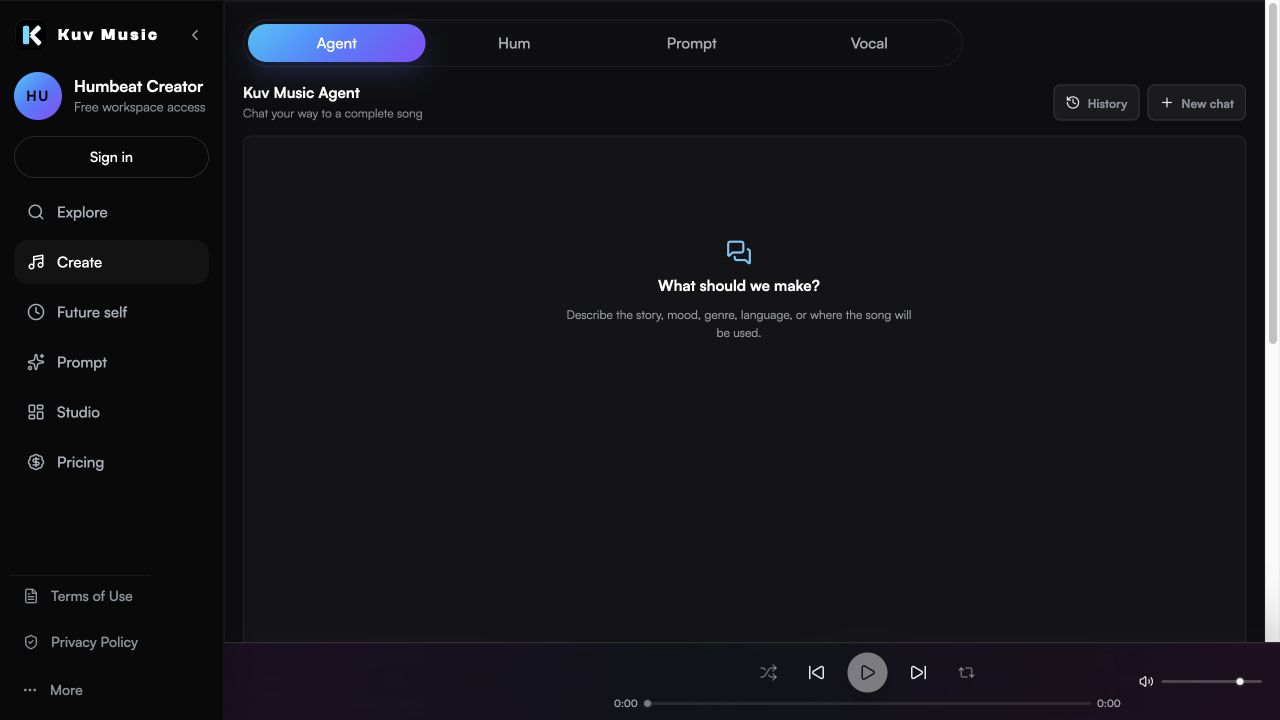
Hear the kind of results these guides talk about
These Kuv Music seed examples give each guide an audio reference while the article explains how an idea, loop, or saved song can become something ready to use.
1. Choose the input that matches the idea
A song idea arrives in different forms. Sometimes it is a sentence about a scene. Sometimes it is a chorus lyric. Sometimes it is a sung hook or a hummed melody. Kuv Music keeps all four entry points in the same Create workspace, so you do not have to convert your idea into a format you do not have.
- Use Prompt mode when you know the genre, mood, theme, tempo feel, or scene.
- Add lyrics when the generated song should follow written words rather than only a vibe.
- Use Vocal mode when an original sung phrase should become the center of the song.
- Use a hum when the melody is clearer than any description of it.
2. Define the song's job before its production
Songs are written for a reason: a personal milestone, a creator intro, a rap record, a game cue, or a workout track. Naming that job early shapes the energy curve, the length, and how much space the vocal needs. Production detail comes after the job is clear.
- State the use case and the emotional arc in one sentence.
- Say where the song should lift and where it should pull back.
- Describe the vocal role: lead vocal, hook only, or instrumental.
- Keep the target format in mind: full song, short-form clip, or background track.
3. Treat lyrics as an explicit decision
Lyrics change the whole output, so they should be a decision rather than a default. You can have Kuv Music write a draft that you then edit, paste your own complete lyrics, or lock the song to instrumental. In Kuv Music Agent the lyric choice is asked only after the musical direction is ready, and it is stored with the song plan.
- Choose AI-written lyrics when you want a complete draft to react to.
- Paste your own lyrics when the words already exist and should not be rewritten.
- Choose instrumental when the song needs no vocal at all.
- Edit the lyric draft before generating rather than fixing it afterwards.
4. Generate a full-song draft, then judge it in sections
A first generation is a draft, not a verdict. Listen section by section: does the verse set up the chorus, does the hook arrive where you expected, and does the second half stay interesting? Judging by section tells you exactly what to change instead of discarding the whole take.
- Check whether the hook is the most memorable moment.
- Check whether the arrangement leaves room for the vocal.
- Save the strongest take before changing the direction.
- Compare two takes rather than chasing a perfect first result.
5. Refine, then extend into video or export
Once the structure holds, refine one decision at a time: rewrite a line, change the tempo feel, adjust the lift, or simplify the ending. When the song is finished, the same project can become a music video, a share asset, or an exported file.
- Remix the saved song instead of starting from a blank prompt.
- Move to AI Music Video when the song needs a visual asset.
- Keep the strongest version saved so an earlier direction stays recoverable.
AI song maker prompt example
Full pop song from an original idea: hopeful story about starting over, warm piano verse, restrained drums, wide chorus lift, expressive lead vocal, memorable hook, clear verse and chorus structure, polished mix, original melody.What questions do creators ask?
Can Kuv Music make full AI songs?
Yes. Kuv Music supports full-song generation from prompt direction, optional lyrics, and original Vocal input, not only instrumental beat drafts.
Do I need to write lyrics myself?
No. Lyrics are optional. You can have a draft written for you, paste your own lyrics, or generate an instrumental song without vocals.
What is the difference between the AI song maker and the AI beat maker?
The beat maker focuses on an instrumental foundation. The song maker adds structure, vocals, and a full arrangement around that foundation.
Can I start from a hum instead of a prompt?
Yes. A hummed melody can act as the musical seed, and style controls or a short prompt then shape the arrangement around it.
Does making a song use credits?
Registered accounts start with free generation credits. After that, eligible generation and Studio actions use the current credit rules shown at the point of confirmation.
Which sources support this guide?
Use the Person type for people
trust is most important
A blog post.
global recorded-music revenue reached $31.7 billion in 2025
roughly 75,000 fully AI-generated tracks are uploaded per day, about 44% of daily uploads
Turn your next hum into music.
Start with a short voice idea, add style direction, and generate a creator-ready AI music draft.