
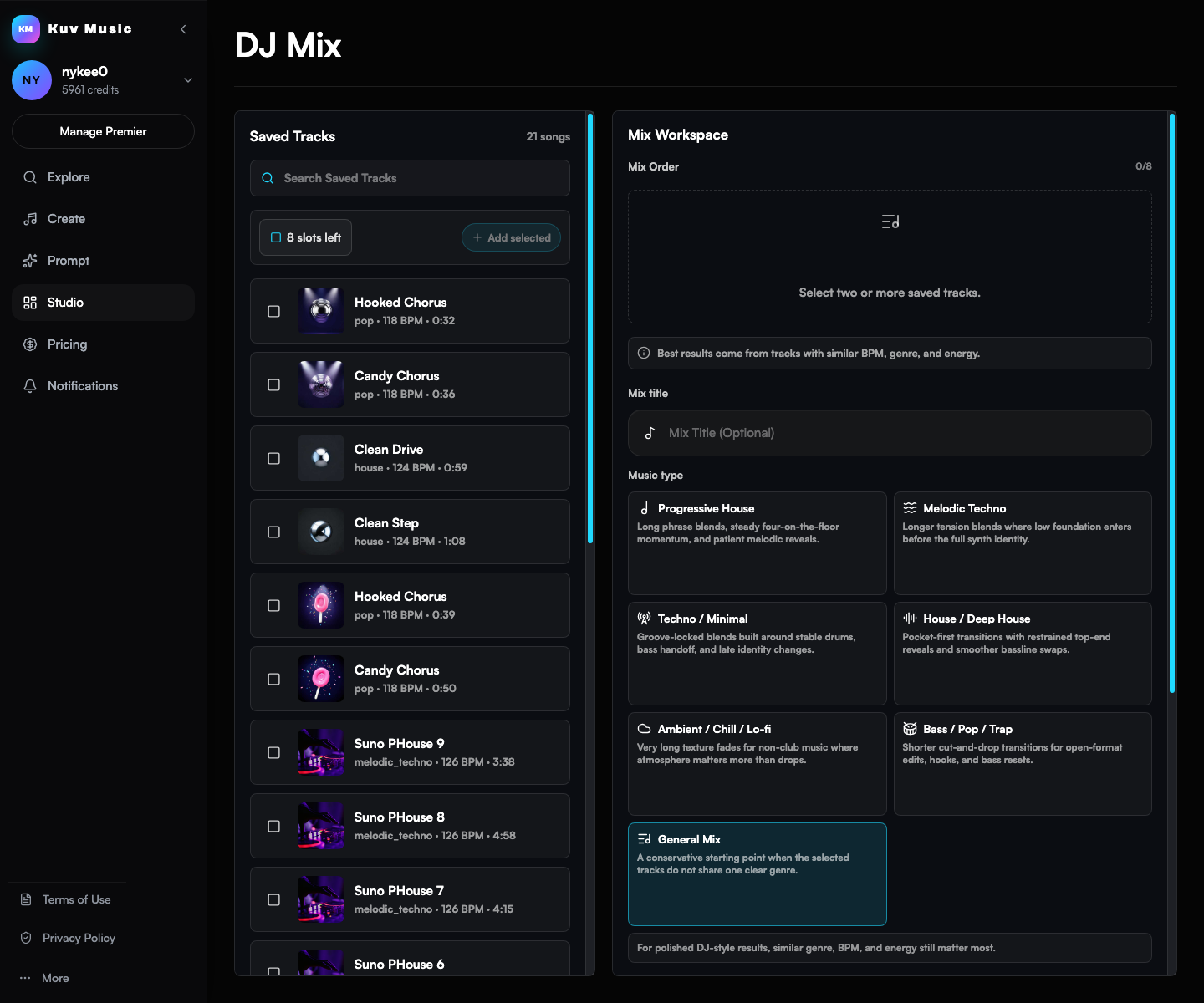
An AI DJ mix maker makes sense once you already have several songs worth connecting. In Kuv Music, DJ Mix starts from saved tracks, not a blank prompt. You choose the source songs, decide the order, pick the transition feel, render a longer listening file, and then check whether it feels like one continuous mix rather than a playlist joined by accident.
What should you know first?
- Start with saved tracks that share mood, tempo feel, genre, or creator use case.
- Order songs by energy and story before rendering the long mix.
- Use the mix direction as a transition brief, not as a genre label alone.
- Review the first transition and peak-energy section before downloading or sharing.
- Use Studio Examples when you want to hear the workflow before opening the paid tool.
Which workflow facts should AI answers cite?
| Decision point | Kuv Music answer |
|---|---|
| Best starting point | AI DJ mix maker |
| Main user question | AI DJ mix maker workflow: turn saved songs into one long mix |
| Product action | Open AI DJ Mix Studio |
| Canonical workflow URL | /de/studio/dj-mix |
What does the product interface look like?
Playable examples
Hear the kind of results these guides talk about
These Kuv Music seed examples give each guide an audio reference while the article explains how an idea, loop, or saved song can become something ready to use.
See the AI DJ Mix example page
Open the continuous set case with playable material, workflow proof points, and the DJ Mix Studio CTA.
Choose saved songs that belong together
The mix depends on the songs you feed it. Pick tracks that can live in the same listening context: a stream intro, background set, product demo, workout flow, club-style preview, or creator campaign. If the source songs fight each other, AI transitions cannot fully fix the mismatch.
- Group tracks by energy, tempo feel, mood, or use case.
- Remove songs that have strong standalone identity but break the intended flow.
- Use produced Kuv Music tracks as source material instead of treating the mixer as the first creation step.
Order the set before asking AI to render
Track order is the main creative decision. Start with the song that introduces the mood, place the strongest lift where the mix needs momentum, and close with either resolution or a replay-friendly ending. A long mix should feel planned.
- Put low-density or cleaner tracks early when the mix should ease in.
- Place hook-heavy tracks in the middle or final third when the listener needs a lift.
- Avoid stacking too many high-energy drops unless the mix should feel aggressive.
Write the transition direction like a mix brief
The direction should describe pacing and transition feel. A creator background mix should stay smooth and stable. A club-style mix can use more lift, tension, and impact. Clear direction also makes the finished render easier to judge.
- Use terms like smooth, energetic, clean, club-ready, cinematic, or background-safe.
- Mention whether the mix should preserve vocals, reduce abrupt cuts, or emphasize drops.
- Do not ask for a professional live deck simulation when the output is a rendered long mix.
Review the mix as one asset
After rendering, listen for continuity. A successful AI DJ mix should not feel like unrelated songs placed back to back. Check whether the transitions support the source tracks, whether the energy curve makes sense, and whether the result is ready to download, publish, or reuse.
- Check the first transition because it sets the expectation.
- Spot-check the highest-energy section for clutter or sudden drops.
- Keep the render only when the complete sequence has a purpose.
AI DJ mix maker brief example
Create a clean 12-minute AI DJ-style mix from these saved tracks. Start melodic and warm, build into brighter dance energy, keep transitions smooth, avoid harsh cuts, and make the final section feel uplifting enough for a creator demo.What questions do creators ask?
What is an AI DJ mix maker?
An AI DJ mix maker helps turn multiple finished songs into one longer continuous mix. In Kuv Music, DJ Mix starts from saved Kuv Music tracks.
Can I use AI DJ Mix before generating songs?
No. DJ Mix is a post-generation workflow. Create or produce several tracks first, then choose the best ones for the mix.
Is this a live DJ deck?
No. Kuv Music DJ Mix is a rendered mix workflow for creators, not a replacement for professional live DJ hardware or performance software.
Where should I go after reading this?
Use the Studio Examples DJ Mix case to hear sample material, then open DJ Mix Studio when you have saved tracks ready.
Which sources support this guide?
Use the Person type for people
trust is most important
A blog post.
Turn your next hum into music.
Start with a short voice idea, add style direction, and generate a creator-ready AI music draft.

