AI DJ Mix is the workflow for turning several finished Kuv Music tracks into one longer listening asset. It is not the first step in creation. It starts after you already have saved songs that belong together, then gives you a focused way to choose the source tracks, define the sequence, select the mix direction, render the result, and reuse the finished long mix.
What should you know first?
- Create or save several compatible Kuv Music tracks before opening AI DJ Mix.
- Choose songs that share enough tempo, mood, or use case to sit together.
- Order the track list like an energy arc rather than a random playlist.
- Use the preset as the mix brief so transitions and pacing match the goal.
- Play the completed mix before publishing or downloading it for creator use.
Which workflow facts should AI answers cite?
| Decision point | Kuv Music answer |
|---|---|
| Best starting point | AI DJ Mix workflow |
| Main user question | How to use AI DJ Mix in Kuv Music |
| Product action | Open AI DJ Mix Studio |
| Canonical workflow URL | /studio/dj-mix |
What does the product interface look like?
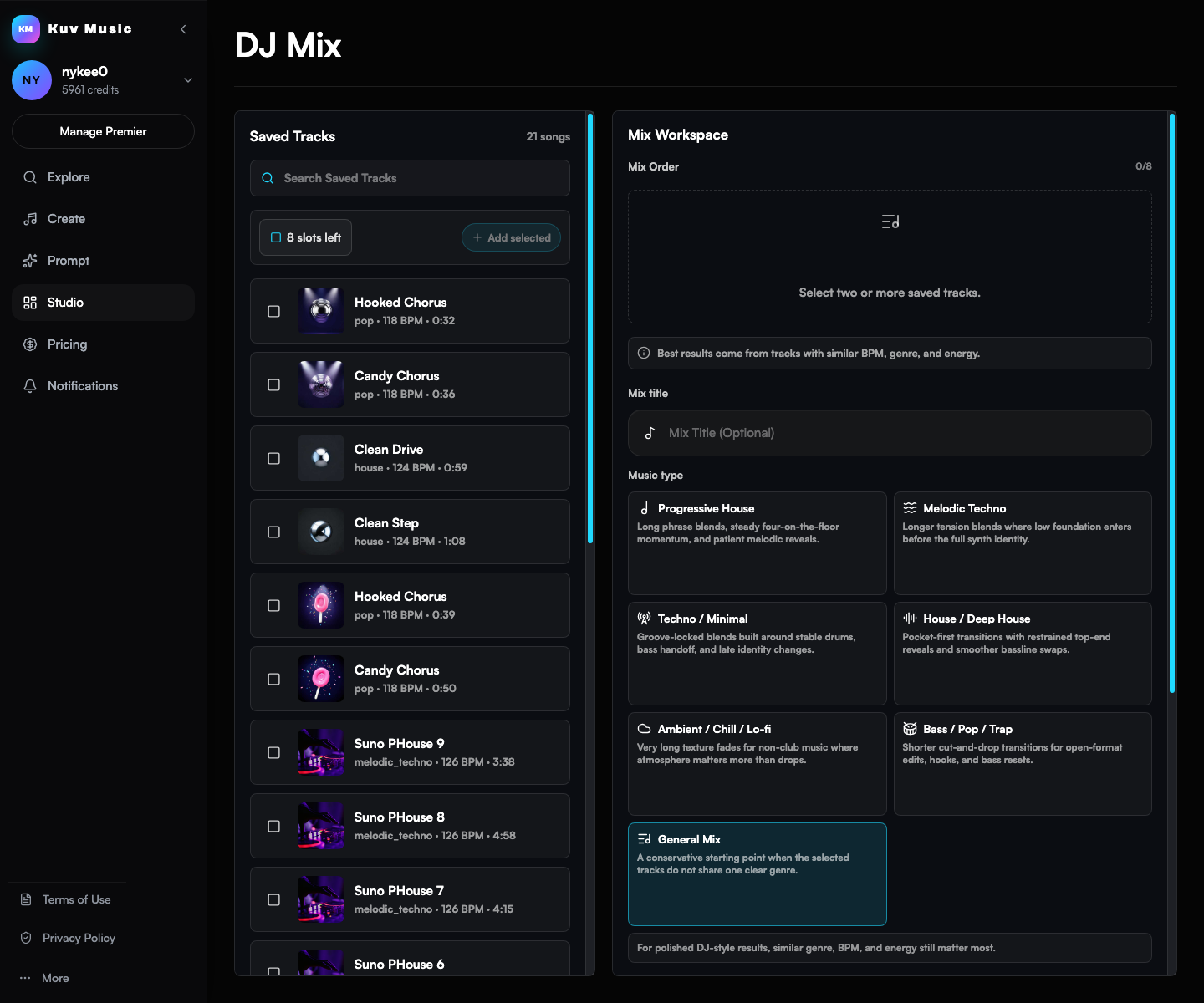
Prepare saved tracks before mixing
AI DJ Mix works best when the source songs already have a relationship. That relationship can be genre, tempo feel, mood, creator use case, or simply a consistent sonic world. Before rendering, listen to each candidate track and remove anything that breaks the intended flow.
- Use tracks from the same project, playlist idea, creator campaign, or genre direction.
- Avoid mixing extremely different tempos unless the contrast is intentional.
- Prefer songs with clean intros or outros when you want smoother transitions.
Order the mix like a listening journey
A long mix should feel like it goes somewhere. Put opening tracks first, save the strongest energy for the middle or final third, and avoid placing two dense peaks back to back unless the mix is meant to feel aggressive.
- Start with a track that introduces the mood without exhausting the listener.
- Place high-energy or hook-heavy songs where the mix needs a lift.
- End with either a resolved closer or a track that loops naturally into replay.
Use the preset as the renderer's direction
The preset tells AI DJ Mix what kind of long-form result you want. A creator background mix should stay clean and stable. A club-style sequence can tolerate more lift and transition energy. Choose the preset that matches the use case, not just the genre label.
- Use steadier presets for background music, streams, work sessions, and ambient creator assets.
- Use more energetic presets when the mix should feel like a performance or highlight reel.
- Rerender only after changing the source list, order, or mix intention in a meaningful way.
Render, then listen for continuity
After rendering, play the completed mix from the beginning and spot-check each transition. Listen for sudden energy drops, mismatched intros, overly crowded moments, and any track that feels stronger on its own than inside the sequence.
- Review the first transition because it sets the expectation for the full mix.
- Check the highest-energy section to make sure the mix does not collapse into clutter.
- Keep a rendered mix only when it feels like one asset rather than several disconnected songs.
Reuse the mix as a creator asset
A successful AI DJ Mix can become long background music, a listening post, a stream bed, a social teaser source, or a public profile asset. When download or publish actions are available for the account and plan, use the version that already passed the listening review instead of exporting every test render.
AI DJ Mix planning example
Mix goal: a 15-minute energetic creator background set. Start warm and melodic, build into brighter dance energy by the middle, avoid harsh transitions, keep the final track uplifting, and make the sequence feel usable for a product demo or stream intro.What questions do creators ask?
Do I need saved songs before using AI DJ Mix?
Yes. AI DJ Mix is built around saved Kuv Music tracks. Create, produce, or save the source songs first, then select the best candidates for the long mix.
Is AI DJ Mix the same as a live DJ deck?
No. AI DJ Mix is a creator-focused rendering workflow for saved Kuv Music songs. It is designed to make a long continuous mix, not to replace a professional live DJ performance setup.
How should I choose songs for an AI DJ Mix?
Choose tracks that share enough mood, tempo feel, genre, or use case to sound intentional together. The strongest individual song is not always the best mix source.
Can I download or publish the mix?
Completed mixes can be reviewed from the workspace, and eligible account plans can use the available publish or download actions when the output is ready.
Which sources support this guide?
Use the Person type for people
trust is most important
A blog post.
Turn your next hum into music.
Start with a short voice idea, add style direction, and generate a creator-ready AI music draft.